What’s new in Milestones Professional 2017?

  • Full undo feature, with the ability to undo up to 100 actions. An undo counter on the status bar indicates how many actions can be “undone.”
  • Intuitive CTRL-A to select either all symbols or all tasks.
  • Independent date headings can be attached to task rows.
  • View the selected symbol in the status bar.
  • Add a web or file link to any freeform text block.
  • Choose border line pattern and colors for free-form text blocks. Also, change the colors of individual lines of text.
  • Support for hi-res monitors.
  • It’s now possible to select a group of symbols and shift their dates.
  • Show the after status (incomplete) version of a bar in the legend.
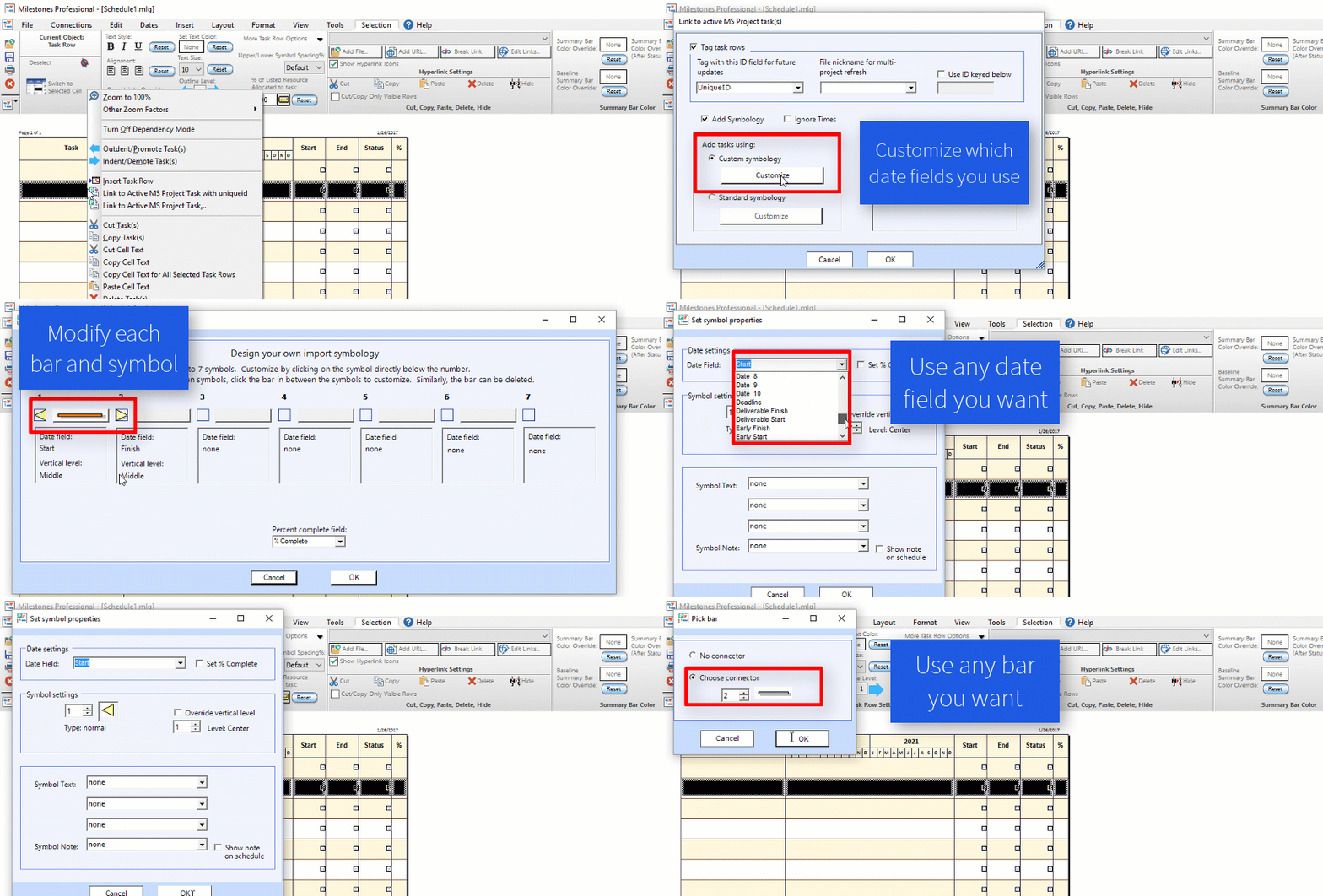
  • Design your own import symbology for Microsoft Project.
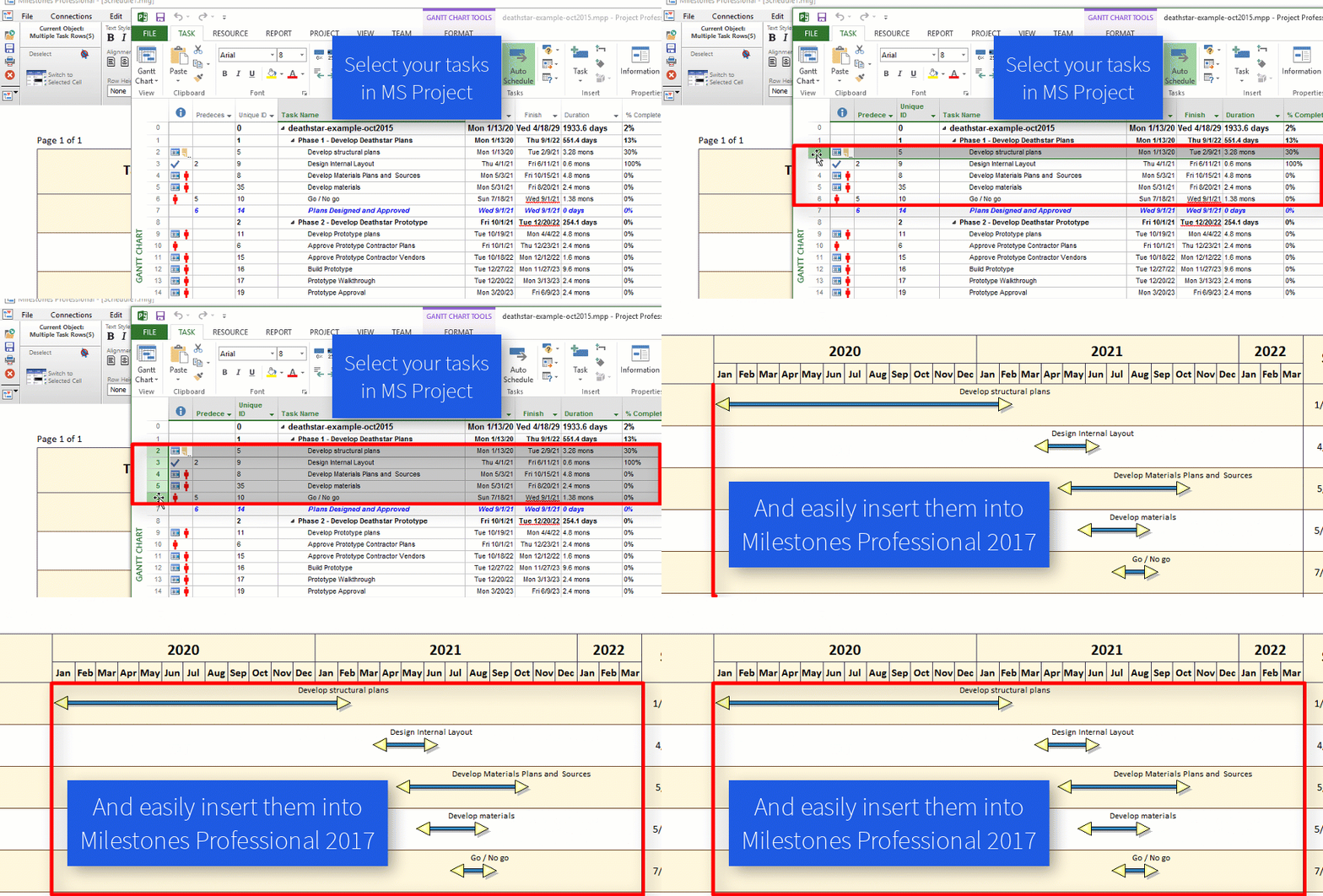
  • When linking to Microsoft Project, select a group of tasks to import.
  • Create a variety of schedules from Microsoft Outlook calendar or tasks using a simple wizard. Also, export a Milestones Professional schedule to Outlook as a task list.
  • Create a schedule from Excel and keep it up to date with a refresh.
  • Much more!

Undo… Anything!

A new Multiple Undo feature has been added to Milestones. Now all actions can be undone. You can set the number of actions that can be undone from 1 to 100 (the default is 20). This is done using the Tools | Program Options | Edit screen:

Design your own Symbology with any Project date fields!

See how you can totally customize your symbology with Milestones Professional 2017:

Easily grab multiple tasks from MS Project

In past versions, one Microsoft Project task could be linked via the “Link to Active MS Project task” feature. Now, groups of tasks can be selected in Microsoft Project. Then, the link feature makes it possible to link all selected tasks at once. One option is add all dates from selected tasks to a single row on the Milestones chart. The other option is to have Milestones add new rows for each Project task:

MS Project Import: Append Tasks during Refresh

When using the refresh feature, an option to “append” new tasks is available. Now, it’s possible to use a Project Flag field to indicate the tasks to be added. Additionally, it’s possible to use a Microsoft Project Number field to specify the Milestones row for the new task(s):

Refresh your Tasks from Excel

You can now assign a UniqueID to your tasks when you import from Excel, which allows you to refresh the dates if they have changed in Excel. This also means you can move your symbols and bars around your Milestones schedule.

Improved Freeform Text

With Freeform Text, you now have the option to set Text color on a line-by-line basis:

There’s also more options for Freeform Text borders:

Attach a Date Heading to a Task Row

It is now possible to attach any single type of date heading to a row. Now, when you right-click on the menu to attach a date heading to a row, a dialog appears that lets you remove the heading, attach a copy of the schedule headings, or a single independent heading of any type:

Legend can now automatically show after status (incomplete) version of symbols/bar

If you check the “Show After Status Settings” in the Legend Entry Edit screen, the legend will show the after status (incomplete) version of the symbols/ bar. This makes it easier for people who wish to show legend entries for both complete and incomplete tasks. They no longer need to manually create an incomplete version of their symbols/bar:

Selectively suppress interior column dividers

It’s now possible to suppress the interior column dividers on just one side of the schedule:

Automatic Page Breaks

You can now insert Page Breaks automatically based upon outline level or number of rows:

Datagraph and Valueset Enhancements

It’s now possible to add default ValueSet values to a toolbox symbol. Each symbol can include a default for any or all of the 9 available ValueSets. This makes it easy to build DataGraphs which rely on constant values:

A new ValueSet property makes it possible to display values near the point (point and line graphs) or near the bar for a bar graph:

Even more improvements!

Check out our “What’s New in Milestones Professional 2017” (PDF) to see even more additions and improvements.

© Copyright 2026 - KIDASA® Software, Inc - Privacy Policy - Cookie Policy - Milestones Professional® and KIDASA® are registered trademarks of KIDASA® Software, Inc.