
March 2026 Newsletter
Video: New Feature! Vertical Links within the same Task Row!
We added a new feature to Milestones Professional 2025 (and 2023!) that you can try out for yourselves today. You will need to download the latest update (Help Tab > Download and Install Latest Software Update) to get access to the new feature.
Important note: If you send a schedule with vertical links within the same row, make sure the person receiving the Milestones Schedule also has the latest update!
Check out the video below to see it in action:
Check out our Videos page to see all of our available videos. You can also directly go to our Youtube Channel to see them as well.
Be sure to Subscribe to our Youtube Channel for all the latest and greatest Milestones software videos!
March 2026 Tips and Tricks
For these and more, view Tips and Tricks for March 2026
Replicate a task row date heading
I would like to put a date heading roughly every 12 rows so that I can see the date range no matter where I am on the page.
Change the date range for a single page on the schedule
When you have a long duration project (15 years) is there a way to make the Date Range for Page 1, go from the present date and mark it ending at the half way point, then, for page 2, can page 2 pick up at the half way point and go to the 15 year end point. This way, the 1st half of the project is on page 1 and the 2nd half of the project is on page 2.
Add multiple milestones on different levels
Can you explain why the solid green bar shown below always draws on the row above where I am trying to put it? I can shift it down to the correct row, but I want it to draw in the correct row. The other solid bars work correctly.
Toolbar bottom is cut off
My Milestones schedule is blocking the lower part of the selection bar. Basically, I can’t see the drop-down option to select “Name.” I tried adjusting my view of the schedule by making it larger and smaller, but I still can’t see the option on the selection tab. Do you know how I can fix this view?
Symbol text too far away from symbol
My symbol text is spaced too far away (vertically) from my bar.

Move a symbol on a crowded schedule and get the exact date
I have a symbol I want to move that is very close to other symbols and connectors. When I try to move it, I often get other symbols instead. How do I move one symbol without accidentally moving others?
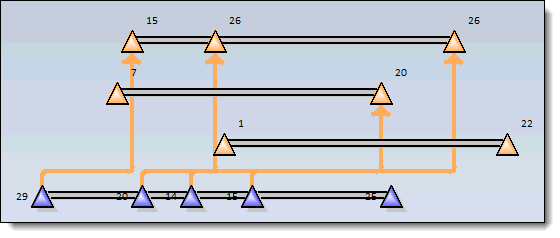
Can’t see vertical links
I have a schedule with quite a few overlapping vertical links and it’s very difficult to determine which symbols are connected. Any suggestions? Here’s an example:
Hide several task rows in a single operation
I know how to hide a single task. Is there a way to hide several tasks in a single operation?
For these and more, view Tips and Tricks for March 2026
Upgrade to Milestones Professional 2025
Click here to Upgrade to Milestones Professional 2025 for only $199 (if you already own any version of Milestones Professional).
To see what has changed, check out our “What’s New in Milestones Professional 2025” page.
Join the Milestones Professional Users LinkedIn Group
For anyone interested, there’s a free Milestones Professional user group on LinkedIn you can join to share best practices, network with other users, and maybe learn some tips along the way from other experienced Milestones users. To join, head over to the following website and click Join: https://www.linkedin.com/groups?home=&gid=6796817
Note: This user group is an unofficial group run by Milestones software users, and is not managed by KIDASA Software, Inc. A free LinkedIn account is required to join the group.